If you are banned, then "This account is not allowed to use WhatsApp" message will reflect when you open your WhatsApp.
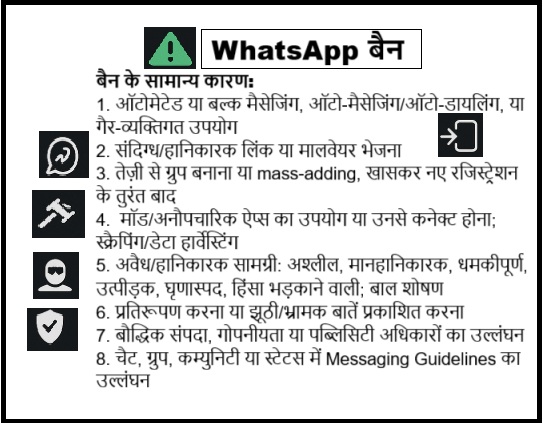
Automated or bulk messaging, auto-messaging/auto-dialing, or other non-personal use.
Sending suspicious or malicious links or malware.
Rapid group creation or mass-adding users, especially soon after registration.
Using modified/unofficial apps or linking through unofficial apps; scraping/harvesting data.
Illegal or harmful content: illegal, obscene, defamatory, threatening, harassing, hateful, or violence-inciting; child exploitation.
Impersonation or publishing false/misleading statements.
Infringing others' rights, including intellectual property, privacy, or publicity.
Violating Messaging Guidelines in chats, groups, communities, or Status.
WhatsApp allows its users to file a complaint against a contact or a group, in case if any illegal content is being sent by the people If WhatsApp, finds the complaint legitimate, then it will deactivate your account.
If you received a message that your account is “Temporarily banned” this could mean you are using an Unofficial Version Of WhatsApp or harvesting information, known as scraping.
Uninstall any unofficial/modified WhatsApp build and any add-ons that connect to it. Install the official app from your Google Play and App Store .
Stop scraping or any automated data extraction or bulk/automated messaging. These violate WhatsApp's Terms.
Wait for the temporary ban to expire, then sign in only with the official app. If violations continue, the ban can become permanent.
Chat Backup:
Android :
More options→Settings → Chats→Chat backup.
Pick Google Account→ Back up.
Set Back up to Google Drive schedule and toggle Include videos if needed.
iPhone
WhatsApp Settings→Chats→Chat Backup.
Tap Back Up Now.
Set Auto Backup frequency; include videos if you want.
Add end-to-end encryption to backups (Android/iPhone)
Settings→ Chats → Chat backup→ End-to-end encrypted backup >Turn on →set password or 64-digit key→ Create. Keep this secret; without it you cannot restore.
How to Run Whats app Web ?
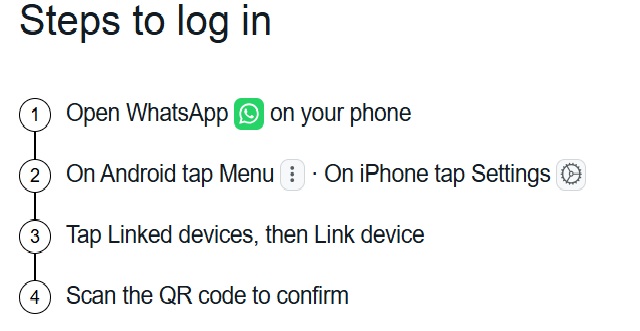
On your computer, open web.whatsapp.com
On your phone, open WhatsApp → Linked devices → Link a device.
Scan the QR on your computer. Or choose Link with phone number and follow the code steps.
Open WhatsApp → Log back in → Continue → enter your number → enter the 6-digit code. This logs out all other devices.
If your phone is lost/stolen
Call carrier and block your SIM.
Get a new SIM with the same number, insert it, open WhatsApp, and re-register with the 6-digit code. The lost phone is logged out.
Important Notes:
Never share your registration code. Messages are end-to-end encrypted. If your chats were backed up to Google Drive or iCloud, they can be restored after verifying your number on a new device.
A WhatsApp account can be active on one primary phone at a time, while companion devices (such as WhatsApp Web, Desktop, or linked phones) can remain linked. No recovery without a SIM for that number. Sometimes WhatsApp auto-verifies.
WhatsApp can't deactivate your account for you, can't locate your phone, and can't disclose who accessed your account.
Suspect Web/Desktop use? Unlink that device from Linked devices.
Protect it after recovery
Turn onTwo-step verification: Settings → Account → Two-step verification. Add an email for resets.
Use Chat lock for sensitive chats.
Enable App lock and your phone's screen lock.
Restore chats from Google Drive/iCloud if you had backups.
Review linked devices regularly and remove any device you don't recognize.
How to change Phone Number ?
Before you start
New number must receive SMS or calls.
Old number must be the number currently registered in WhatsApp. Check in WhatsApp → Settings → your profile photo.
You cannot do this on Web/Desktop. Use your phone.
Android: same phone
Insert the SIM with the new number.
WhatsApp→ More options → Settings→ Account →Change number→Next.
Enter old number, then new number, both in full international format.
Choose Notify contacts option: All contacts, Contacts I have chats with, or Custom. Groups are notified automatically.
Tap Done, then verify the new number.
iPhone: same phone
Insert the SIM with the new number.
WhatsApp →Settings →Account →Change Number.
Enter old and new numbers, pick Notify contacts if you want, then complete verification. Groups are notified automatically.
Moving to a new phone and new number
First run Change number on your old phone to keep chats.
Then install WhatsApp on the new phone, register the new number, and restore your backup.
Storage Full
Go to Settings→ Storage and data → Manage storage to review and delete large files, forwarded media, and unnecessary chats to free up storage.
For Complaint
For any query/complaint related to WhatsApp Terms of Service / WhatsApp India Payments Terms of Service, please contact designated Grievance Officer by filling this Form or by the detail given below:
Designation: Grievance Officer
Email: grievance_officer_wa [at] support [dot] whatsapp [dot] com
Address- WhatsApp, LLC
Unit B8 and B10
The Executive Center
Level 18, DLF Cyber City, Building No. 5,
Tower A, Phase IIIGurgaon - 122002, India
Customer can also contact WhatsApp in India via post at the address given above.
Corporate Address
WhatsApp LLC,
1 Meta Way,
Menlo Park, California 94025,
United States of America
This updated version is I am not satisfied.my friends are more than 5 chats.my time is lose this version useing.please provide older version type.
thank you sir
This is Ishan Khandhar - Head Operations, Jain Global Card (an initiative by JITO).
JITO is an social organization and you check about JITO and all its projects by referring to the link besides - www.jito.org/.
We understand the our account was banned as you received the complaints from our members, but it was about spreading the awareness of one of our flagship project "Jain Global Card", to our very own members.
We have printed all our promotional materials with the number which has got banned and would be difficult if we don't find solutions to it.
So, I would kindly request you to suggest on the block to get back the number and on how to take it forward.
Looking forward to your positive response!
Thank you.
Regards,
Ishan Khandhar
Head - Operations, Jain Global Card - JITO.
Hello sir mera phone Maine restore kiya jisse mera Sara app unnistal ho gya phir bad me Main jab WhatsApp is number se create or rha hu to nhi ho rha h
Help me sir




Comments
my number is banned so restart my whatsapp number
Restart my WhatsApp number
You can only share with up to five chats
This updated version is I am not satisfied.my friends are more than 5 chats.my time is lose this version useing.please provide older version type.
thank you sir
all whtaap image lost plzz help
My 1500 whtapp pic lost when i downloaded new versions plzz help i do nt recover this
Unbanned my number
Sir my number has been banned please sir unbanned my number its my business number.
Please UnBanned Whatsapp Number
Hello,
To Whomsoever It May Concern.
This is Ishan Khandhar - Head Operations, Jain Global Card (an initiative by JITO).
JITO is an social organization and you check about JITO and all its projects by referring to the link besides - www.jito.org/.
We understand the our account was banned as you received the complaints from our members, but it was about spreading the awareness of one of our flagship project "Jain Global Card", to our very own members.
We have printed all our promotional materials with the number which has got banned and would be difficult if we don't find solutions to it.
So, I would kindly request you to suggest on the block to get back the number and on how to take it forward.
Looking forward to your positive response!
Thank you.
Regards,
Ishan Khandhar
Head - Operations, Jain Global Card - JITO.
WhatsApp is not working
Hello sir mera phone Maine restore kiya jisse mera Sara app unnistal ho gya phir bad me Main jab WhatsApp is number se create or rha hu to nhi ho rha h
Help me sir
Not verified number
My WhatsApp number is blind please remove this number
my whatsapp banned
please sir my WhatsApp banned please remove my number sir please
my whatsaap number is banned.
my whatsaap number is banned. please remove my number
what is banned
is banned from using banned please unban may whatsapp
my whats app blocked
My watsapp number is parmanetly banned same problem what to do is there any solution