1. Same-Operator SIM Swap At A Store (Keep Same No.)
Steps:
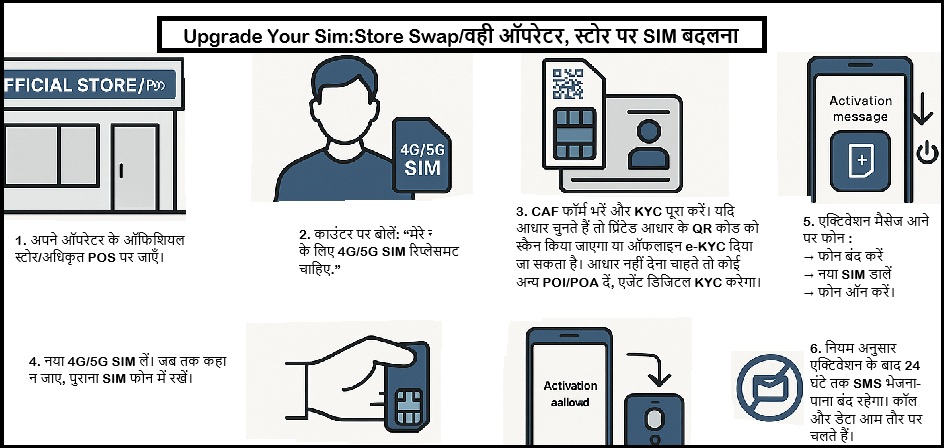
Find your operator's official store or authorized point-of-sale (POS).
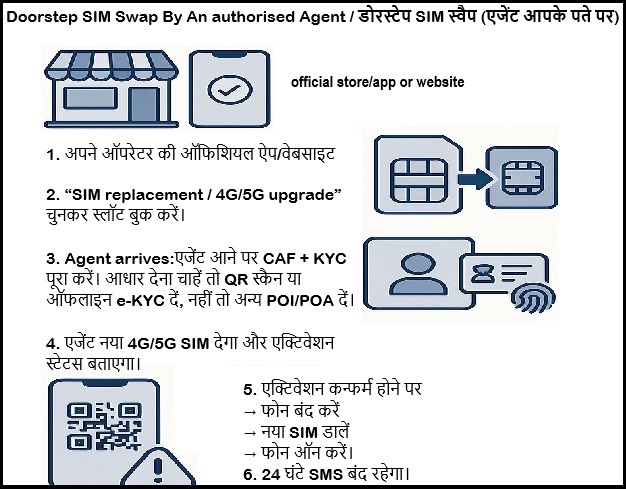
Ask for a 4G/5G SIM replacement for your number.
Complete full KYC and sign the CAF (Customer Application Form). If you choose Aadhaar, they must scan the QR on your printed Aadhaar or use offline e-KYC; otherwise give another valid ID/address proof and they will capture POI/POA via digital KYC.
Receive the new 4G/5G SIM. Keep your old SIM in the phone until they tell you to switch.
Insert the new SIM when instructed. Activation follows per operator.
When you get the activation message, power off → insert new SIM → power on.
SMS in/out is barred for 24 hours after SIM replacement by DoT rule. Calls and data usually work.
After activation, verify all mobile connections in your name on TAFCOP .
Documents Required:
One Photo ID and Address Proof accepted under telecom KYC.
Aadhaar can be used voluntarily or you can use Passport, Voter ID, Driving Licence, etc
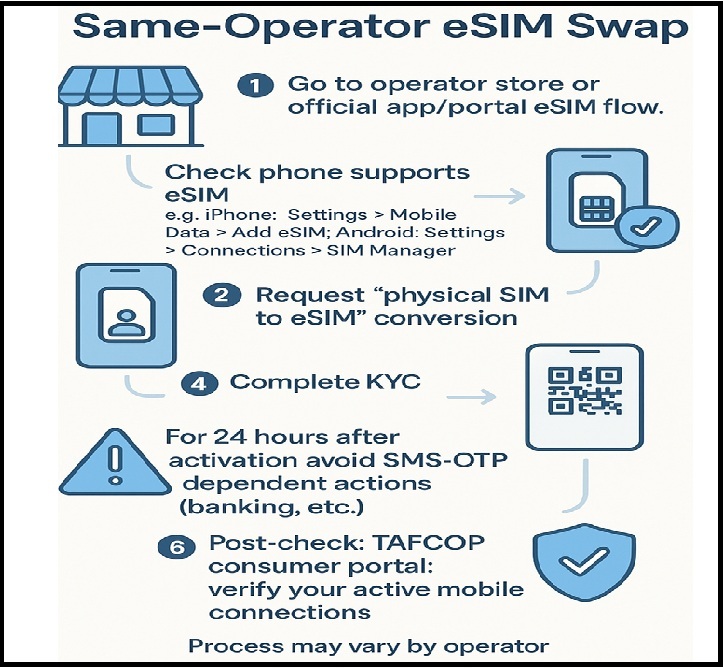
Go to operator store or official eSIM flow in app/portal.
Confirm your phone supports eSIM.
Request physical SIM to eSIM conversion from your operator (store or official app portal).
Complete KYC.
Operator issues an eSIM activation/QR profile. On your phone, add the mobile plan by scanning the QR and follow on-screen prompts. The physical SIM will deactivate after eSIM activation.
For the first 24 hours after activation, avoid workflows that depend on SMS-OTP.
Use TAFCOP to confirm only legitimate connections exist in your name.
4. Port To Another Operator With 4G/5G (MNP) and Keep Your Number
Eligibility:
Current SIM should be active more 90 days.
Postpaid dues cleared.
No ownership-change request in progress.
Number not sub-judice or barred by a court.
If corporate, carry an authorization letter; less then or equal to 100 numbers per letter.
At least 7 days since any SIM swap/replacement.
Steps:
Generate your UPC:
From the number you will port, SMS to 1900: PORT {10-digit number}.
You receive an 8-digit UPC by SMS from 1901.
UPC validity: 4 days in all LSAs except J&K/Assam/North Eastern Region requires 30 days.
Visit the new operator's store/PoS.
Ask to port in with your UPC.
Fill two forms at the counter: CAF (Customer Acquisition Form) + Porting Form.
Submit KYC and pay the porting charge if asked.
You get an SMS confirming submission and a 24-hour withdrawal window.
Wait for cutover, then switch SIMs
Porting time: 3 working days within the same LSA; 5 working days inter-LSA or for corporate numbers; up to 15 working days in J&K/Assam/North Eastern Region.
Cutover occurs at night; expect no service for up to 4 hours. Insert the new SIM after the stated time.
If you change your mind :
Within 24 hours of submitting the request, cancel by SMS: CANCEL {10-digit number} to 1900. Porting fee is non-refundable.
Use TAFCOP to confirm only legitimate connections exist in your name.
Documents Required:
KYC ID and Address Proof per telecom rules (e.g., Passport, Voter ID, Driving Licence; Aadhaar is optional).
Corporate porting: Authorization letter if applicable.