1. Eligibility
- Must hold an active Savings, Current, NRE/NRO, or Salary account with SBI.
- KYC must be fully updated in bank records as per RBI norms.
- Must have a valid Officially Valid Document (Aadhaar, PAN, Passport, Voter ID, Driving Licence, etc.).
- Registered mobile number is compulsory for OTP and SMS authentication.
- Applicant must be the account holder; joint holders eligible if mandate allows.
- Account must be active and not under freeze/restriction.
- Address must be updated in SBI records; card delivered only to registered address.
2. Get a New SBI EMV Card
1. Online SBI (NetBanking)
- Log in to OnlineSBI .
- Enter your User ID and Password.
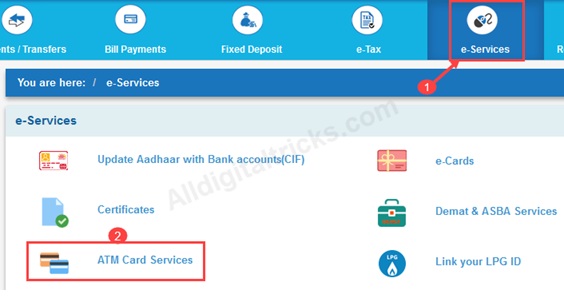
- Go to e-Services → ATM Card Services → Request ATM/Debit Card.
- Select Account & Card Type:
- Choose the account for which you want the new card (Savings, Current, etc.).
- Select the EMV card type you prefer (Global, Platinum, Contactless, etc.).
- Confirm delivery address ( your registered address).
- Enter OTP received on registered mobile.
- Submit request.
- Time: 7-10 working days for delivery.
Procedure to Register
- अगर आपने पहले रजिस्टर नहीं किया है तो 'New User' पर click करें अन्यथा login पर click करें ।
-
e-Services पर click करें, फिर ATM Card Services चुनें।
- खाता और EMV कार्ड के प्रकार चुनें:
- वह खाता चुनें जिसके लिए आप नया कार्ड चाहते हैं (Savings, Current, आदि)।
- अपनी पसंद का EMV कार्ड प्रकार चुनें (Global, Platinum, Contactless, आदि)।"
- डिलीवरी पता कन्फर्म करें (आपका पंजीकृत पता)।
- Enter OTP जौ पंजीकृत मोबाइल पर प्राप्त हुआ हैं |
- Submit request.
2. YONO SBI Mobile App
- Open the YONO App:
- Log in using your credentials.
- Navigate to Service Requests:
- Tap on Service Request from the dashboard.
- Choose ATM/Debit Card.
- Select Request New Card or Replacement Card.
- Choose account and card type.
- Authenticate with profile password or OTP.
- Submit request.
- Time: 7-10 working days for delivery.
Procedure to Register
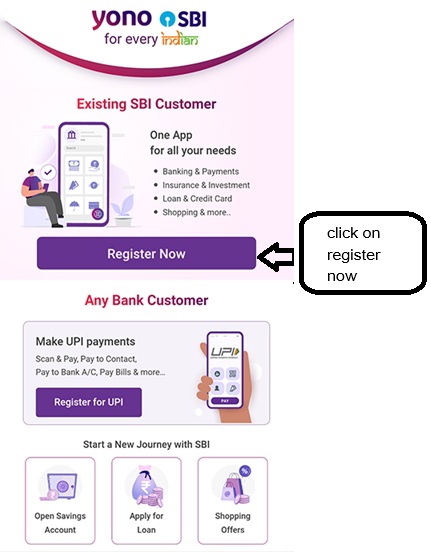
- अगर आपने पहले रजिस्टर नहीं किया है तो 'Register Now' पर click करें ।
-
Services पर click करें, फिर Card चुनें।
- नया कार्ड या रिप्लेसमेंट कार्ड चुनें।
- खाता और कार्ड प्रकार चुनें।
- प्रोफ़ाइल पासवर्ड या OTP के साथ प्रमाणित करें।
- Submit request.
3. Branch (Offline)
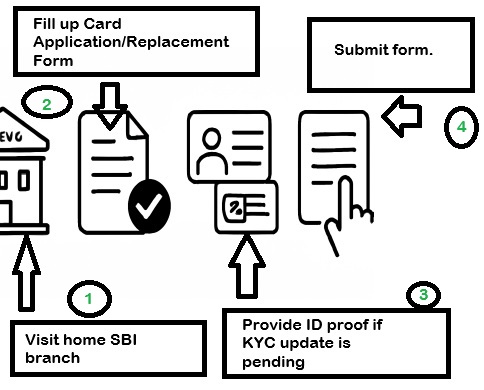
- Visit your home SBI branch.
- Fill out the Debit Card Application/Replacement Form .
- Provide ID proof if KYC update is pending (Aadhaar, PAN, Passport, Voter ID, etc.).
- Submit form.
- Time: 7-12 working days.
- The branch will process your request, and the card will be delivered to your registered addre
- Documents: Application form + OVD if KYC not updated.
 To expand image
4. ATM Request (Self-Service)
- Insert your existing SBI ATM card into an SBI ATM.
- Navigate to Services → ATM Card Services → Request New Card.
- Confirm the request using OTP sent to your registered mobile number.
- The request will be processed, and the card will be delivered to your registered address.
- Time: Approximately 7-10 working days.
 To expand image
5. Phone Banking / Customer Care
- Call SBI Phone Banking numbers: 1800112211 / 18004253800.
- Authenticate using your account details and OTP.
- Request a new or replacement ATM/Debit card.
- The bank will process your request and dispatch the card to your registered address.
- Time: Approximately 7-10 working days.
3. Required Documents
Note: If your KYC details are already updated, you may not need to submit documents again.
- Identity Proof: Aadhaar, PAN, Passport, Voter ID, Driving License, etc.
- Address Proof: Aadhaar, Passport, Utility Bills, Bank Statements, etc.
- Photograph: Passport-sized photo (if required by the branch).
4. After You Receive the Card
- PIN generation: Use Green PIN (SMS PIN {last 4 digits of card}{last 4 digits of account} to 567676), then set PIN at SBI ATM or via YONO.
- Activate usage: In YONO/NetBanking, enable Domestic/International, POS, ATM, E-Com, and Contactless as per need.
- Annual charges: Classic/Global -₹125 + GST; higher variants (Gold/Platinum) more. Replacement -₹300 + GST.
5. Key Points to Remember
- Card always delivered to registered address only.
- Update KYC/address in branch before requesting if outdated.
- Keep mobile number active for OTP; without it, request cannot proceed.
- Lost/damaged cards must be blocked immediately before requesting replacement.




Comments
Account opening issue
Your kollam oyur branch my relatives apply pmjdy account more than days.But the branch is not given Wht is the reason.
branch enquiry
Hlw sir /madam i want a sbi branch in my property pls tell me for this information immediately
new emv card
There is no congratulation message at last of aplying new emv atm card through net banking
new atm card
Through net banking i cant aply for new emv atm card.
New ATM Card
I Have not received my new ATM card till this date
atm card not received
sir my new atm card which is not received till date .please do necessary action & provide my new atm card