Before Filing on AirSewa: First contact your airline directly (customer care or Nodal Officer). Keep written records. If unresolved, proceed to AirSewa.
Note: To file a grievance, you must be logged in to the AirSewa portal.
To start with the procedure, you need to be ready with the Essential Documents & Details Required
Sr. No.
Category
Required Information/Documents
Purpose
1
Personal Details
Full name, email ID, mobile number
For registration and communication
2
Flight Information
Airline name, flight number, PNR, date of travel
To identify the journey and incident
3
Ticket Proof
E-ticket or booking confirmation
Confirms your booking and eligibility
4
Boarding Pass
Physical or digital copy (if available)
Verifies travel completion or boarding denial
5
Incident Evidence
Photos, receipts, or written communication with airline
Supports your grievance (e.g., damaged baggage, delay)
6
Complaint Description
Clear summary of what happened, when, and what resolution you seek
Helps AirSewa and DGCA assess the issue accurately
What Complaints Does AirSewa Accept?
Sr. No.
Category
Examples
1
Flight Delay/Cancellation
Unreasonable delay, no compensation offered, cancelled without notice
2
Denied Boarding
Bumped off flight, overbooking
3
Baggage
Lost, delayed, or damaged baggage
4
Refund
Refund not received, delayed refund
5
Accessibility
Assistance not provided to passengers with disabilities
6
Crew / Service Conduct
Rude behaviour, in-flight medical emergency mishandling
7
Airport Agencies
Customs, Immigration, BCAS, Security issues at airport
Go to the Sign Up Option, enter your details, and create a password to complete registration To Expand Image
Step 2: Log in to the portal and file a complaint
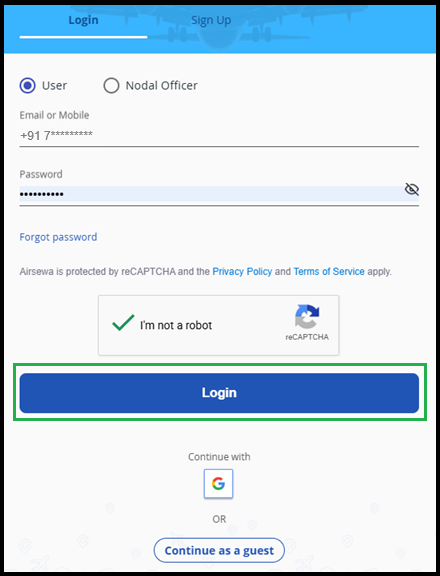
Go to the Sign in Option, Enter your details, and password to login To Expand Image
Go to the Grievance Option, select the appropriate category, and click Next. To Expand Image
Step 3: Enter Travel Details and Submit
You will be redirected to the Traveller and Travel Details section. Enter your journey details (PNR, date, airline, flight number), upload supporting documents, describe the incident clearly, and submit. To Expand Image
Airlines are expected to respond within 30 days of an AirSewa complaint being filed. You can track the status of your complaint at any time using your Grievance Reference Number on the portal or app.